System Mechanic Deepclean is a powerful automated maintenance feature designed to improve PC speed, stability, and overall system health in one guided process. It combines multiple optimization and repair tools into a single routine that scans your computer, identifies performance issues, and safely removes unnecessary data. This process helps restore system efficiency, free up storage, and reduce slowdowns caused by clutter, outdated files, and fragmented data. Many users refer to it as a deep clean because it goes beyond basic junk file removal and targets multiple areas that affect performance.
What Does System Mechanic Deepclean Do?
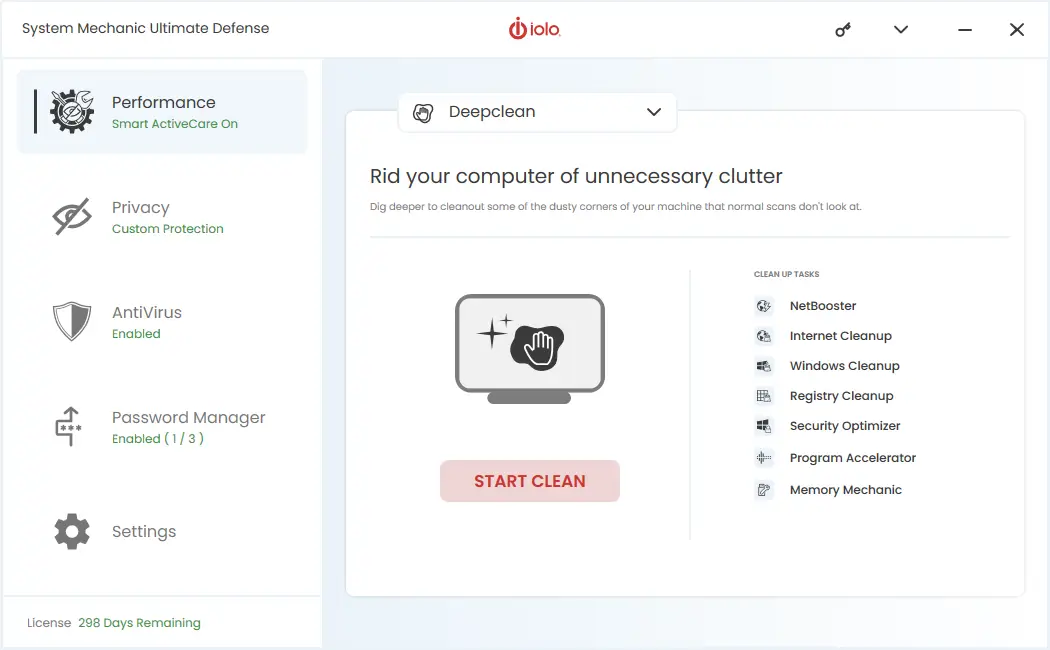
When you run Deepclean in System Mechanic, the tool performs a series of targeted steps:
NetBooster
Optimizes hidden Windows internet settings to improve connection speed, helping deliver faster browsing, smoother streaming, and quicker downloads.
Internet Cleanup
Removes temporary internet files, browsing data, and online clutter that can slow down browsers and consume valuable storage space.
Windows Cleanup
Deletes system junk files, outdated logs, broken shortcuts, and unnecessary temporary files created by Windows.
Registry Cleanup
Scans and repairs invalid or damaged registry entries that may cause errors, crashes, or reduced system stability.
Security Optimizer
Identifies and fixes Windows security settings that may leave your device vulnerable to threats.
Program Accelerator
Improves file access speed by reorganizing and aligning program data. This step can boost responsiveness and make applications launch faster.
Memory Mechanic
Frees up RAM by closing unused or memory-intensive background tasks, helping your PC run more smoothly.
By combining these tools into one process, Deepclean provides a convenient way to maintain performance without requiring manual tuning. Regular use can help extend the life of your PC, improve speed, and keep Windows running efficiently.
Deepclean is included in all System Mechanic editions, including System Mechanic Standard, System Mechanic Professional, and System Mechanic Ultimate Defense. Regardless of the version you choose, this automated optimization feature helps maintain speed, stability, and overall PC performance as part of the core toolkit.
Save 60% on System Mechanic and get Deepclean plus powerful performance tools.
Explore the latest offers on our System Mechanic deals page today.