iolo Updater
Keep Your Software and Drivers Up to Date
- Automatically scans for outdated, missing, or corrupted software and drivers
- Updates software and drivers with one click to save time and effort
- Helps improve PC performance and stability with the latest updates and fixes
- Keeps your PC more secure with current software patches and driver versions
- Schedules scans and updates for a time that works for you
- Backs up drivers before updating so you can restore an earlier version if needed
- Lets you choose what to update with manual update and exclusion options
- Works with Windows® 11, 10, 8.1, 8, and 7
- 30-day money-back guarantee
Save 43%
$34.99 $19.99
Discount promo code applied automatically, no coupon required
Immediate Download Available after Purchase
Pricing in USD for 1-year License
What Is iolo Updater?
iolo Updater is an easy-to-use tool for keeping your Windows software and device drivers up to date. It scans your PC for outdated, missing, or corrupted software and drivers and helps you install the latest available versions.
Instead of checking individual software websites and hardware manufacturers for updates, iolo Updater brings the process together in one place. You can review available updates and install the ones you want with just a few clicks.
Keeping your software and drivers current can help improve PC performance, stability, security, and compatibility. iolo Updater can also automate regular scans, schedule updates, and create driver backups for added protection.
Why Keep Your Software and Drivers Updated?
Software and device drivers play an important role in how your PC works. Drivers help Windows communicate with hardware such as your graphics card, Wi-Fi adapter, printer, speakers, webcam, and other connected devices.
When drivers become outdated, hardware may not work as expected. You may experience performance problems, compatibility issues, lag, errors, or system crashes.
Software applications also need regular updates. New versions can include security patches, bug fixes, performance improvements, compatibility updates, and new features. Keeping programs current can help protect your PC from known vulnerabilities while helping applications run more reliably.
Checking every program and device manually can take time. iolo Updater simplifies the process by checking your PC and showing you which updates are available.
Update Software and Drivers with One Click
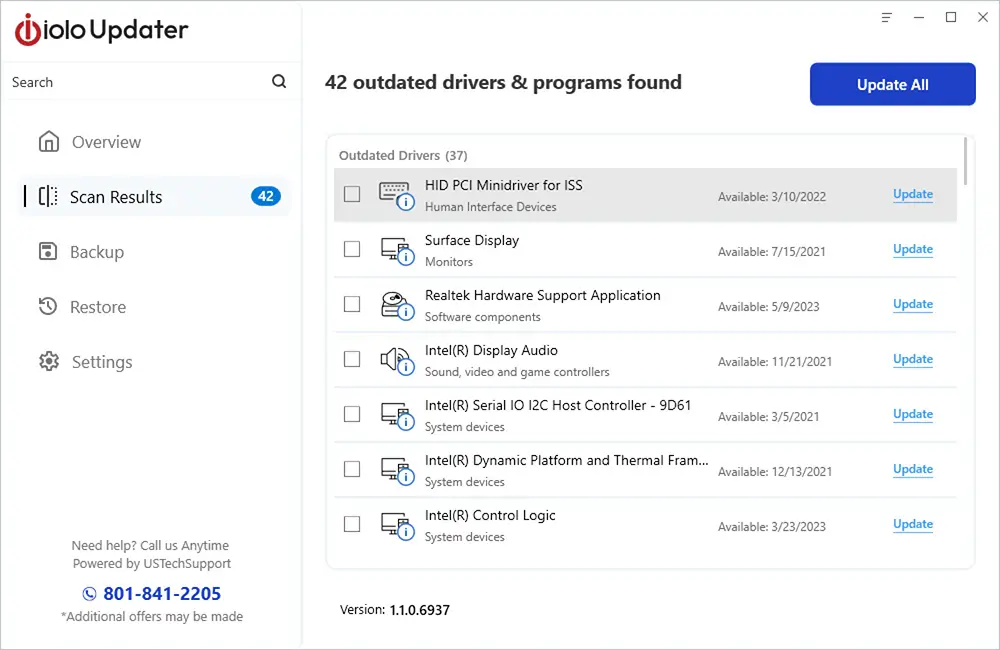
iolo Updater makes updating your PC simple. It scans your system and provides a clear list of software and drivers that may need attention.
You can review the recommendations and install the latest available versions with a single click. This saves you from searching different websites, finding the correct download, and installing every update separately.
Whether you need to update one driver or several applications, iolo Updater gives you a convenient way to manage updates from one place.
Automatically Find Outdated or Missing Updates
Automatic scanning helps identify outdated, missing, or corrupted software and device drivers installed on your PC.
iolo Updater compares the versions on your computer with its comprehensive database of software applications and drivers. It then shows you recommended updates so you can quickly see what may need to be updated.
This makes routine PC maintenance easier and reduces the need to manually check version numbers yourself.
Improve PC Performance, Stability, and Security
Keeping software and drivers updated is about more than getting the newest version. Regular updates can also help your PC run more efficiently and reliably.
Optimize Performance
Updated drivers can include performance improvements and bug fixes for your hardware. Keeping them current can help devices work efficiently and may improve overall system performance.
Improve Stability
Old or incompatible drivers and software can contribute to errors, unexpected lag, crashes, and other problems. Regular updates help maintain compatibility with Windows and other software on your computer.
Increase Security
Software updates often contain important security patches. Installing current versions can help address known vulnerabilities and reduce potential security risks.
Save Time
Manually checking every program and device driver can be tedious. iolo Updater helps automate this process, so you can spend less time searching for downloads and more time using your PC.
Schedule Software and Driver Updates
You don't need to remember to check for updates every time. With the convenient scheduler, iolo Updater can run regular scans at times that work for you.
You can schedule scans and updates around your routine. This makes it easier to keep software and drivers current without interrupting your normal PC use.
Choose Which Updates You Want to Install
Automation is useful, but sometimes you may want more control. iolo Updater gives you manual update options so you can decide what gets installed.
Review the recommended software and driver updates, then select only the ones you want. You can also exclude specific programs or drivers from future updates when needed.
This gives you the convenience of automatic scanning while keeping you in control of changes made to your PC.
Back Up Drivers Before You Update
Occasionally, a newer driver may not work as expected with a particular device or system configuration. That's why iolo Updater includes driver backup protection.
You can create a backup of your existing drivers before installing newer versions. If you experience a problem after an update, you can restore an earlier driver when needed.
This adds an extra layer of protection and gives you greater confidence when installing driver updates.
What Software and Drivers Can iolo Updater Update?
iolo Updater supports a wide range of common Windows software and hardware drivers. This makes it useful for maintaining many of the programs and devices you use every day.
Supported Driver Types
- Graphics cards
- Wi-Fi adapters
- Sound cards
- Storage devices, including HDDs and SSDs
- Printers and scanners
- Bluetooth devices
- Webcams
- USB devices and hubs
- Game controllers
- Virtual reality headsets
- External audio interfaces
- Touchpads
- Optical disk drives
Supported Software Types
- Web browsers
- Communication applications
- Internet software
- Multimedia applications
- Networking software
- Productivity applications
- Security software
- Social applications
- Utilities
Supported updates depend on the software and hardware installed on your PC and the versions available in the iolo Updater database.
How Does iolo Updater Work?
Keeping your PC updated doesn't have to be complicated. iolo Updater handles the process in three simple steps.
1. Scan Your PC
iolo Updater scans your computer for outdated, missing, or corrupted software and device drivers.
2. Review Recommended Updates
Once the scan is complete, you'll see a list of available updates. Review the recommendations and choose which software or drivers you want to update.
3. Install Your Updates
Install the selected updates without having to search for each new version yourself. You can also schedule future scans to help keep your PC current.
Who Should Use iolo Updater?
iolo Updater is designed for Windows users who want a simpler way to keep their software and drivers current. You don't need to be a PC expert or know which manufacturer website to visit for every device.
It can be especially useful if you have several applications and hardware devices to maintain, want to automate routine update checks, or simply want to spend less time searching for the latest software and driver versions.
With automated scans, one-click updates, scheduling, manual controls, and driver backups, iolo Updater gives you an easier way to handle an important part of regular PC maintenance.
Keep Your PC Up to Date with iolo Updater
Outdated software and drivers can affect performance, stability, compatibility, and security. Keeping everything current helps your PC and connected devices work as intended.
iolo Updater brings software and driver maintenance into one convenient application. Scan your PC, review available updates, install the versions you need, and schedule regular checks for the future.
Spend less time searching for updates and more time enjoying a PC that stays current.
iolo Updater System Requirements
To run System Mechanic, your computer must meet the following requirements:
- Windows® 11, 10, 8.1, 8, 7
- Intel or AMD Dual Core Processor or higher
- 2 GB RAM
- 100 MB of available hard disk space
- Microsoft Windows Compatible Video Card
- Internet connection
- Windows “Administrator” user account