What Was New in System Mechanic 22, 23, and 24?
Looking for older System Mechanic release notes and feature updates? You’re in the right place. Below you’ll find updates from previous major versions.
For the latest updates to System Mechanic, check the current, up to date, System Mechanic News page.
System Mechanic 24.x Updates
The System Mechanic 24.x version introduced practical improvements focused on system awareness, storage management, and security enhancements.
System Mechanic – Updates to Version 24.5
This update introduced helpful notifications designed to keep your system secure and running smoothly.
Unsecure Internet Connection Notification
System Mechanic now alerts you when your Wi-Fi connection does not meet recommended security standards, helping protect your personal data while online.

Low Disk Space Notification
Receive timely alerts when available disk space becomes critically low, so you can take action before performance is affected.

System Mechanic – Updates to Version 24.3
File De-Duplicator
The new File De-Duplicator helps you reclaim valuable disk space by identifying and removing duplicate files across your system.
- Scans for duplicate files by type and location
- Provides an easy review process before deletion
- Helps free up storage and improve system efficiency
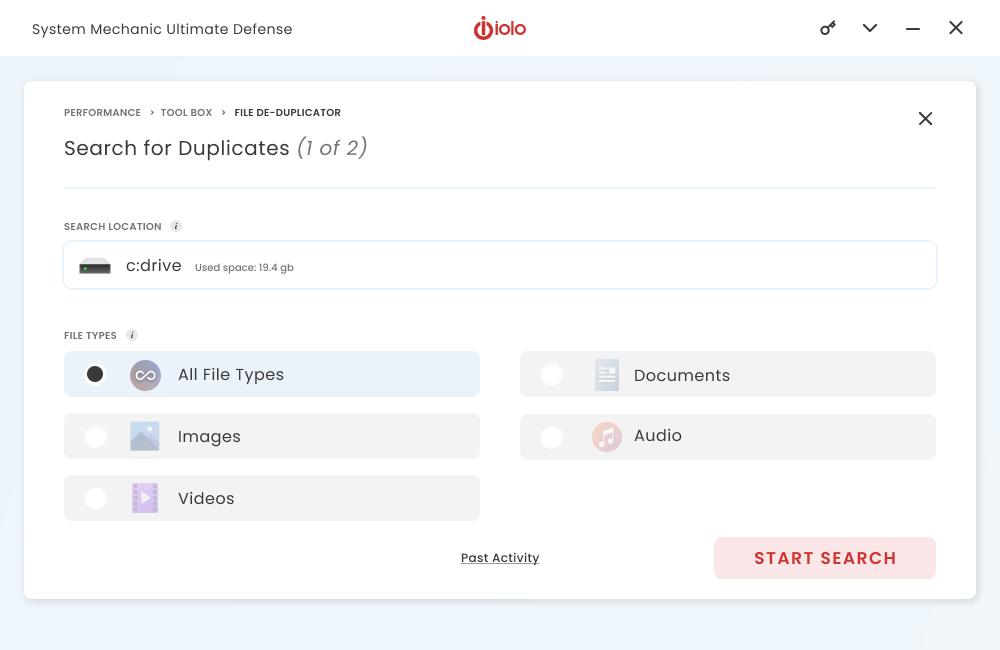
Note: File De-Duplicator is available with System Mechanic Pro and System Mechanic Ultimate Defense. It is only compatible with 64-bit versions of Windows.
System Mechanic – Updates to Version 24
Backup & Restore
System Mechanic now includes Backup & Restore functionality, allowing you to safeguard important files directly on your PC (64-bit Windows systems only).
- Create backups of files, documents, and photos
- Restore lost or damaged files to their original locations
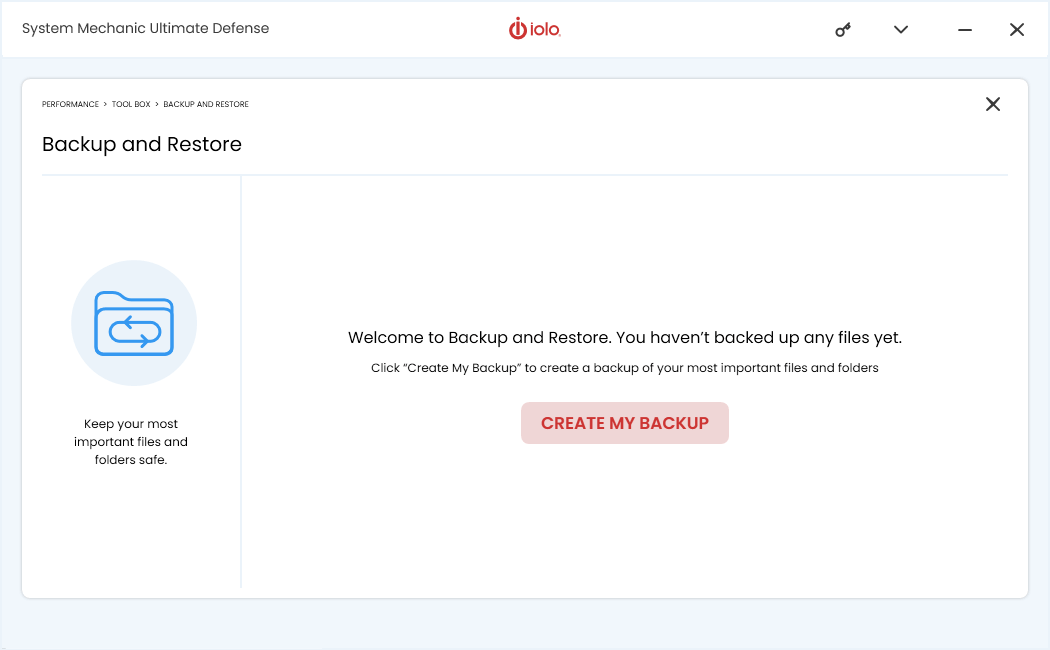
Backup & Restore is available with System Mechanic Pro and Ultimate Defense.
Smart Scan Recommendations – Dark Web Monitoring
Smart Scan now checks whether your email address has appeared on the dark web and provides tailored recommendations to help reduce security risks.
Improved Virus Protection
Virus protection has been enhanced with more frequent definition updates and improved scanning responsiveness for broader threat coverage.
The System Mechanic 24 series continues to build on performance, storage management, and security improvements to keep your PC protected and running at its best.
System Mechanic 23.x Updates
The System Mechanic 23.x series delivered performance, privacy, and usability enhancements designed to give you more control with fewer clicks.
System Mechanic – Updates to Version 23.5
This update to System Mechanic brought some new features as well as the enhancements to existing ones.
New: Fingerprinting Protection
No longer browser-dependent, improved Fingerprinting Protection hides your online habits from potential trackers. Block trackers in real time and shield your personally identifiable information from websites and advertisers.
- Easily toggle protection on or off
- Choose which trackers you block or allow
- Block cookies (the storage of your unique data)
- Easily view your masked fingerprinting history
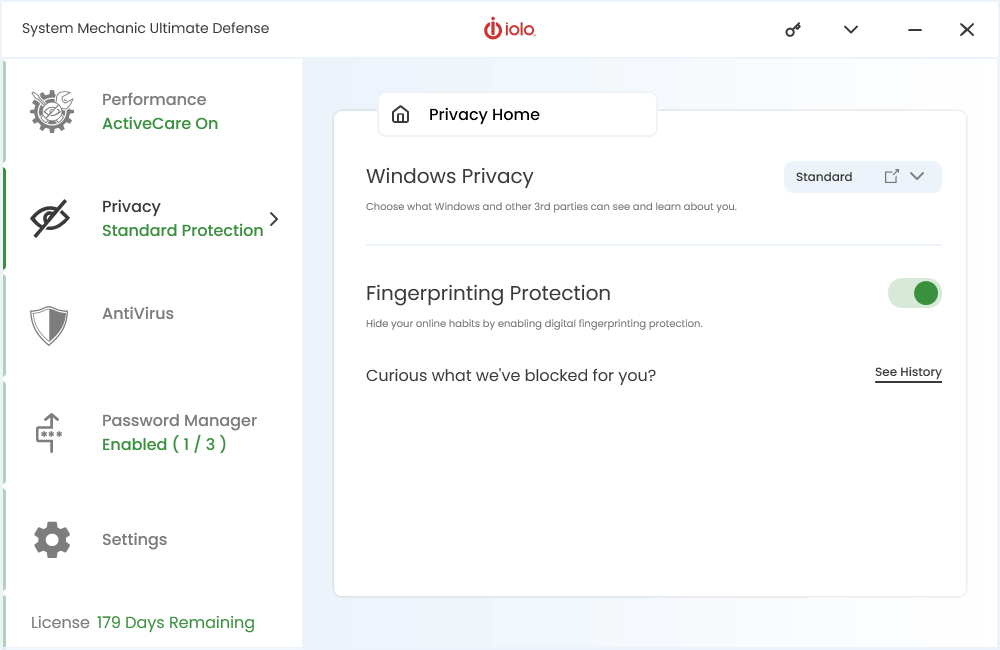
Image: System Mechanic Ultimate Defense - Fingerprinting Protection
New: User-friendly Privacy Permissions
New user-friendly navigation lets you easily configure permissions and manage data sharing effortlessly for both Windows and third-party applications. Easily configure permissions, manage data sharing, and safeguard your personal information with a seamless and intuitive interface. Take control of your privacy with confidence and simplicity.
How to use:
- Open System Mechanic Ultimate Defense and click on ‘Privacy’
- Locate the ‘Windows Privacy’ heading and the dropdown box on the right side
- Select a preset configuration or click on ‘Custom’
- Clicking on the small box with the arrow will reveal custom privacy details
- Use the toggles to turn permissions On and Off
System Mechanic® & Startup Optimizer boost your PC’s startup time
How to use:
- Open System Mechanic, System Mechanic Pro or System Mechanic Ultimate Defense and click on ‘Performance’
- From the Performance Home dropdown, select ‘Toolbox’
- Find and click on ‘Startup Optimizer’
- Startup Optimizer will scan and find potentially unwanted items slowing boot-up time
- Review each item, see community recommendations and impact on performance
- Choose to allow each item to open on start, delay, or be turned off
System Mechanic – Updates to Version 23.3
The latest System Mechanic now unmuzzles your internet speed unlocking hidden bandwidth giving you a blazing fast internet. Plus, now you can get automatic and on-demand processing power when you need it and conserve power when you don’t.
NetBooster Enhancement
NetBooster reclaims valuable network bandwidth reserved by your computer’s operating system. It’s like turbocharging your car!
- Stream and game with less interruptions
- Download files and media faster
- Browse with more tabs open
Throttling up with NetBooster
Take advantage of NetBooster’s optimized internet settings by running a Deepclean scan, which can be started by clicking on the dropdown found inside the Performance pane. Learn mroe about System Mechanic Deepclean.
PowerSense Enhancement
Go beyond your operating system’s compromised settings and unleash all your processing power with PowerSense. Unlock processor cores and get full clock speed when using high-demand apps, such as video editing software or a favorite gaming platform, or conserve power when performing less intensive tasks such as browsing the internet.
How to optimize with PowerSense
- From the Performance window, Select LiveBoost from the dropdown
- Be sure PowerSense is switched to the ON position.
- Click the down arrow in the PowerSense dropdown menu
- Select one of seven different built-in modes.
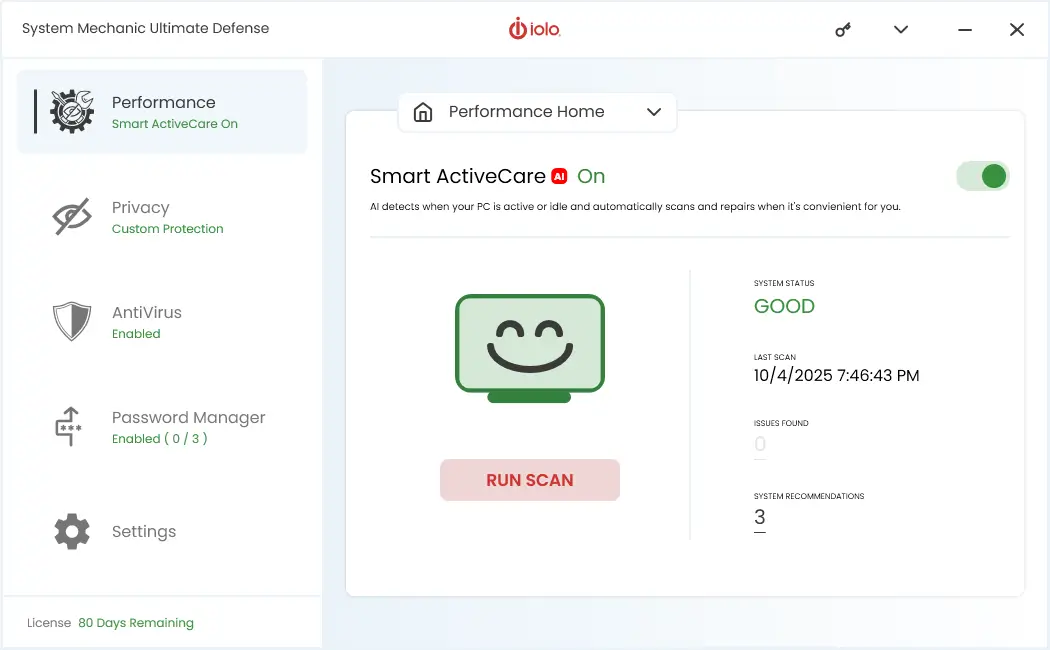
Since the update to version 23, System Mechanic has a fresh look and feel. Easily navigate, explore utilities and optimize with fewer clicks.
System Mechanic – Updates to Version 23
New enhancements include:
- New Personalized Performance Reports
Delivered directly to your inbox, System mechanic keeps you in-the-know on how it’s optimizing and protecting your PC. - New Network Scanner Enhancement
Detect and protect all software-compatible devices using your home’s network with a few simple clicks. - New Whole-Home Protection
Keep all your home devices covered, with easy-to-use network identification. Protect up to 10 devices with only one paid subscription.
Added Features & Enhancements – Details
System Mechanic®, System Mechanic Pro® and System Mechanic® Ultimate Defense™ users will enjoy:
Personalized Performance Reports
See how System Mechanic is keeping your PC optimized and protected with regular reports delivered straight to your inbox.
- Easy-to-read format
- Tailored to your device
- Includes relevant tips and recommendations
System Mechanic 23 features new personalized performance reports to help you quickly see what’s happening under all your computers’ hoods.
- Discover how many security issues were fixed
- Confirm clean-up and defragmenting happen regularly
- Verify deceptive programs have been thwarted
Get more out of System Mechanic and your PC with valuable performance details.
With precise, easy-to-read performance details conveniently dropped in your inbox, System Mechanic can help you:
- Uncover more optimization opportunities by running a quick scan
- Anticipate your PC’s power before launching high-demand apps
- Tweak your security protocol further for greater peace of mind
System Mechanic’s advanced features and tools continue to be the most potent allies in the fight against PC & WiFi slowdown.
How do I sign up for performance reports?
As a valued System Mechanic customer, Performance Reports will automatically be sent to your email address on file. There’s nothing more you need to do.
Protect all home devices with Network Scanner
Network Scanner now includes an easy-to-use tool that detects whether devices running on your home’s network have System Mechanic installed.
Benefits of using Network Scanner include:
- Increased speed & reliability of all network-connected PCs
- Now protects up to 10 home devices
- Added protection and privacy for all PCs connected to the same network
- Delivers greater value and peace of mind
How to use Network Scanner:
- From the Performance section, select “Toolbox” from the dropdown.
- Click on Network Scanner
- While on the Network Scanner page, select the red ‘Scan now’ button.
- A green bar shows System Mechanic is installed, while an orange bar shows it is not.
- Click on the device that doesn’t have System Mechanic installed.
- Follow the prompt asking you to enter your email address to receive instructions on how to install System Mechanic on the new device.
The latest System Mechanic gives you more control over your PC’s performance with fewer steps and confusion.
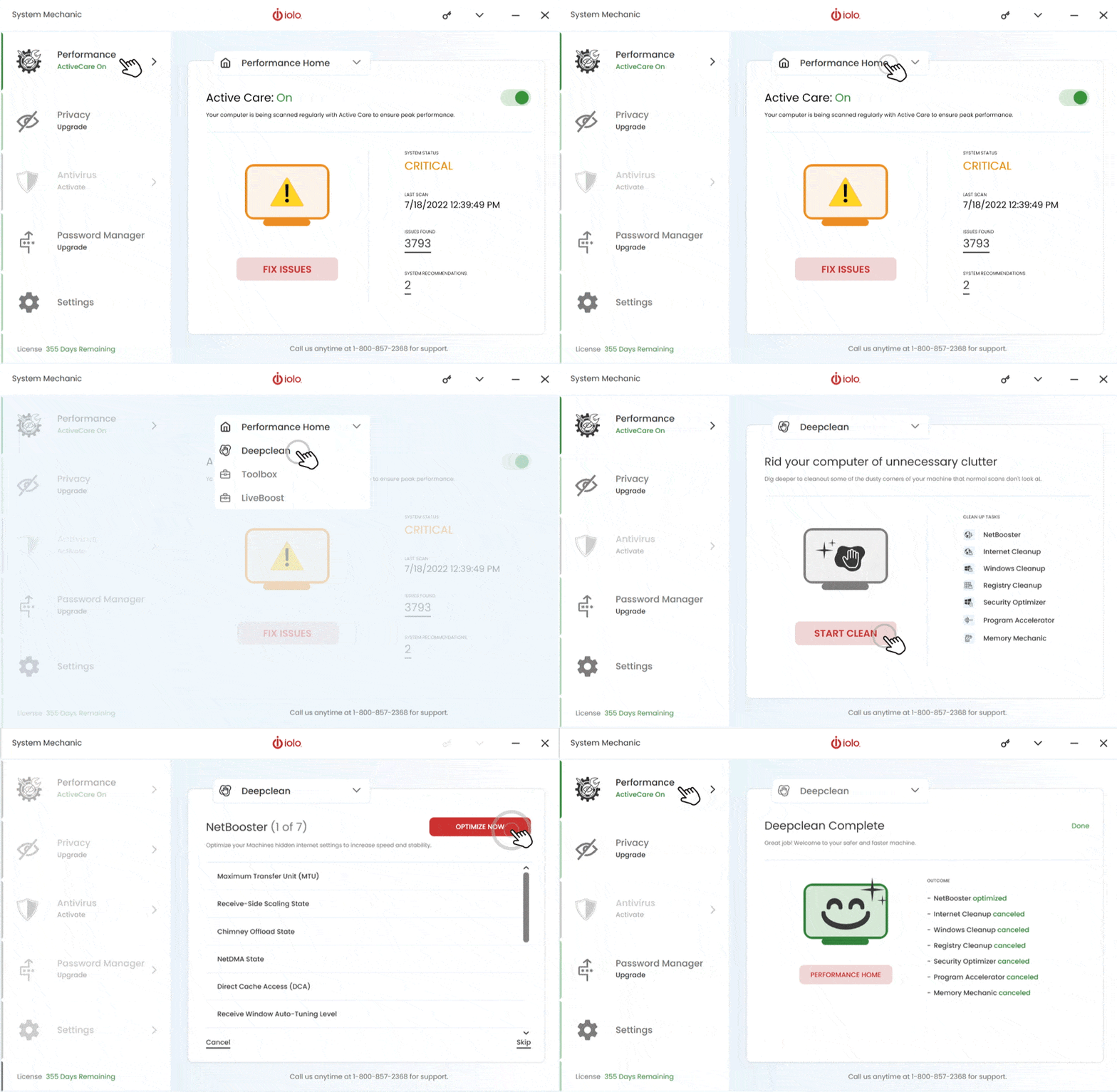
Image: What is New in System Mechanic 23?
Usability Enhancements
Streamlined new dashboard design makes it even easier for you to navigate, and experience your computer operating at maximum performance speed. Below is a screenshot of the UI enhancements/changes to System Mechanic 23.
Image: System Mechanic 23 Dashboard - Better Interface
As always, System Mechanic Ultimate Defense offers best-in-class Windows optimization to speed up all the PCs in your home with just one license. Fine-tune dozens of broadband, hard drive, memory, and processor settings to achieve the very smoothest streaming, gaming, browsing, downloads, video chat, work multitasking, and more.
Enjoy these new enhancements and more in System Mechanic, System Mechanic Pro, and System Mechanic Ultimate Defense!
System Mechanic 22.x Updates
The System Mechanic 22.x series introduced major interface updates, expanded privacy tools, and new utilities to improve performance, security, and ease of use.
System Mechanic – Digital Privacy Protection (update 22.7)
The team at iolo delivered the latest System Mechanic® version 22.7 in September 2022, with new improvements. Find out below about the latest updates to System Mechanic product family.
System Mechanic has a fresh look and feel. Easily navigate, explore utilities and optimize with fewer clicks.
Privacy enhancements include:
- New Fingerprinting Extension
Hide your browsing habits and avoid invasive trackers when you install our digital fingerprinting extension. - New Protect More Devices
Keep all your home devices covered, with easy-to-use network identification. Protect up to 10 devices with only one paid subscription. - New Network Scanner Enhancement
Detect and protect all software-compatible devices using your home’s network with a few simple clicks.
Added features & enhancements
System Mechanic® Ultimate Defense™ customers will enjoy:
Privacy Guardian Fingerprinting Extension
Included within the Privacy Guardian toolbox is a new digital fingerprinting extension.
Benefits of using the Fingerprint Extension include:
- Anonymizes your browsing history
- Prevents identity profiling
- Stops invasive and hyper-targeted ads
Installation instructions:
- From the Privacy section, select ‘Fingerprinting Extension’ from the dropdown.
- Next, select install to add the extension to each browser.
Note: Currently works with Firefox & Opera only. Google Chrome and Microsoft Edge compatibility is coming soon. - Finally, adjust settings, filters and manage options to your liking by clicking on the icon found in your browser’s toolbar.
ByePass Password Manager
Store all your usernames and passwords in one place with our secure password manager.
Benefits of using ByePass include:
- Works across multiple browsers, devices
- Real-time accounts security report
- Scans the dark web for leaked passwords
- Secures passwords, banking information, and more
- Generates strong passwords
How to use ByePass Password Manager:
- Click on the ‘Install’ button next to your preferred browser.
- Fill in the email address field using the same email address you used to sign up for System Mechanic Ultimate Defense.
- Next, enter your activation key. You can find your activation key within the System Mechanic application by clicking on the key icon labeled ‘Product Information’. Copy and paste your activation key into the appropriate field.
- Finally, click ‘Launch’ to add the extension to the browser.
- Bypass is now ready for use while browsing.
- See your security score, generate passwords and adjust settings from within the browser extension found on your browser’s toolbar.
System Mechanic®, System Mechanic Pro® & System Mechanic® Ultimate Defense™ users will enjoy:
Network Scanner Device Identification
Network Scanner now includes an easy-to-use tool that detects whether devices running on your home’s network have System Mechanic installed.
Benefits of using Network Scanner include:
- Increased speed & reliability of all network-connected PCs
- Now protects up to 10 home devices
- Added protection and privacy for all PCs connected to the same network
- Delivers greater value and peace of mind
How to use Network Scanner:
- From the Performance section, select ‘Toolbox’ from the dropdown.
- Click on Network Scanner.
- While on the Network Scanner page, select the red ‘Scan now’ button.
- A green bar shows System Mechanic is installed, while an orange bar shows it is not.
- Click on the device that doesn’t have System Mechanic installed.
- Follow the prompt asking you to enter your email address to receive instructions on how to install System Mechanic on the new device.
System Mechanic Has New Features (update 22.5)
The new System Mechanic is here, more modern, streamlined, and effortless than before. The updated design makes it even easier for you to navigate and use. System Mechanic provides higher operational efficiency, a superior user experience, and intelligent product algorithms – while keeping your privacy and security top priority.
New Easy-to-find Utilities
iolo now packaged all of System Mechanic’s utilities into five (5) clear categories.
- Performance
- Password Manager
- Privacy
- Settings
- AntiVirus
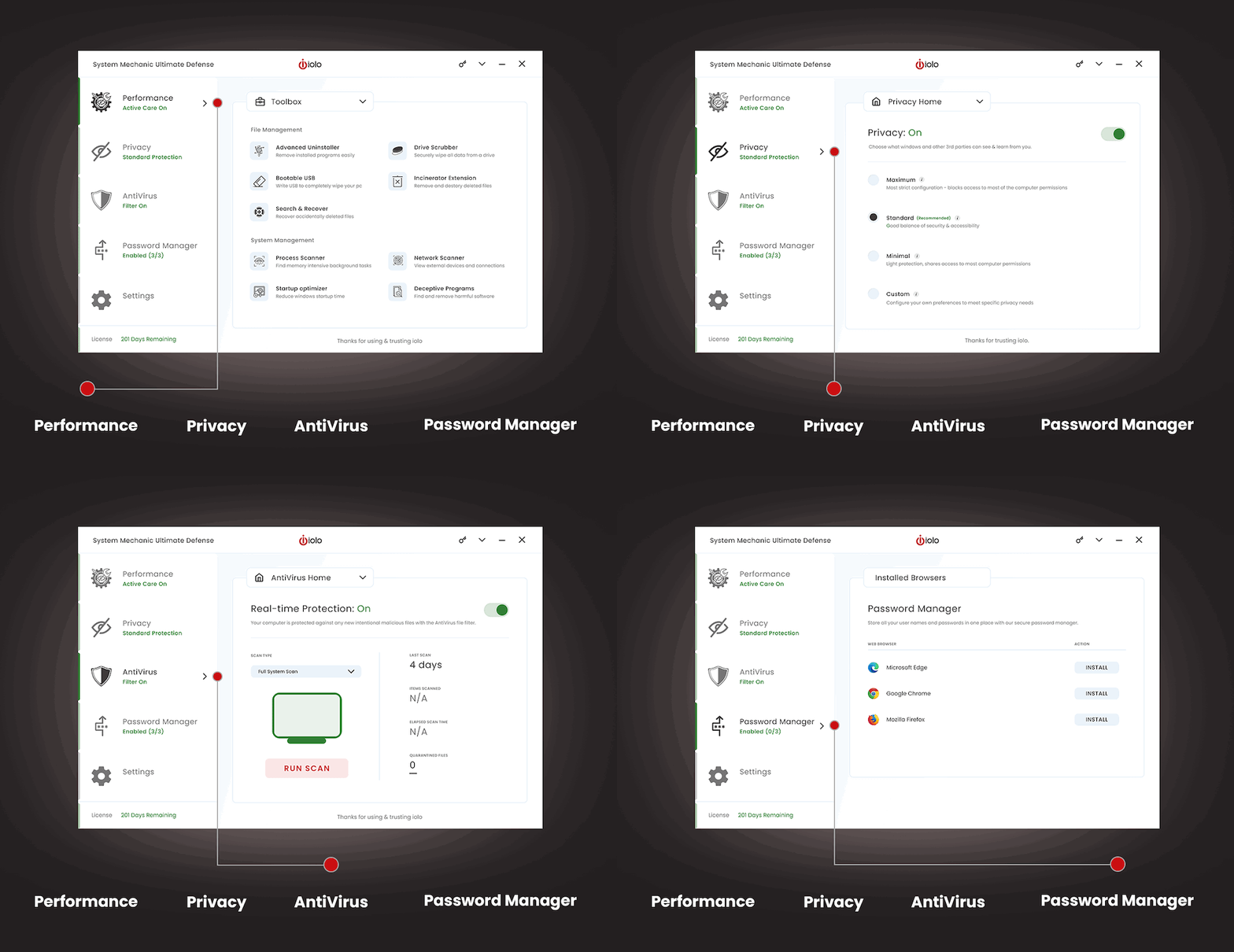
Image: System Mechanic 22 Dashboard
New Intuitive dropdowns
Keeping things tidy, each parent utility category presents a dropdown for easy access to added tools and features.
New Optimize with fewer clicks!
Many utilities can be quickly toggled on or off using the toggle button displayed within the utility window.
New Full feature visibility
Easily see which utilities are enabled or turned off from the navigation pane.
Additional new and enhanced features
Access Active Care in a flash
Active Care now lives on the Performance Home pane giving you quick access to PC optimization. Quickly see your system’s status, last scan, issues, and custom recommendations.
Performance now includes Drive Scrubber
The Performance Toolbox now includes the secure data wiping tool, Drive Scrubber.
Once on the Toolbox pane, you’ll see Drive Scrubber listed under File Management. Clicking on Drive Scrubber allows you to erase every byte of data from a drive from which Windows is not installed.
Performance now includes Search & Recover
Also included within the Performance Toolbox is Search & Recover.
Once on the Toolbox pane, you’ll see Search & Recover listed under File Management. Clicking on Search & Recover allows you to select locations such as hard drives and flash drives for accidentally deleted files and recover them to a new location.
Easy-to-understand Privacy Settings
Beyond simply toggling Privacy On or Off, you can now select from a list of pre-defined configurations:
- Maximum (Most strict configuration)
- Standard (Good balance of security and accessibility)
- Minimal (Light protection)
- Custom (Configure your preferences to meet your needs)
Selecting custom allows you to tailor your security to your specific needs.
Comprehensive protection with AntiVirus
System Mechanic AntiVirus provides powerful, real-time protection against advanced attacks. Just one click thwarts threats and keeps your PC protected.
AntiVirus also now includes Malware Killer and System Shield, allowing you to find and remove dangerous malware from already-infected computers and shielding you from future attacks.
ByePass is now Password Manager
Password Manager detects installed web browsers and shows which browsers you have installed the utility.
Anonymize your searches
Private Search can now be found using the quick link within the menu bar. Once clicked, your browser will open a private and encrypted search engine.
Easy-to-navigate Settings
Settings for all utilities can be found within the Settings pane and by using the corresponding drop-down.
Easily configure:
- Tasks
- Alerts
- Updates
- And more.
Consolidated History
Now you can see all recent events in one, easy-to-find location. Within the Settings pane, select History from the drop-down menu and scroll through recent events to view more details and options.
The latest System Mechanic gives you more control over your PC’s performance with fewer steps and confusion.
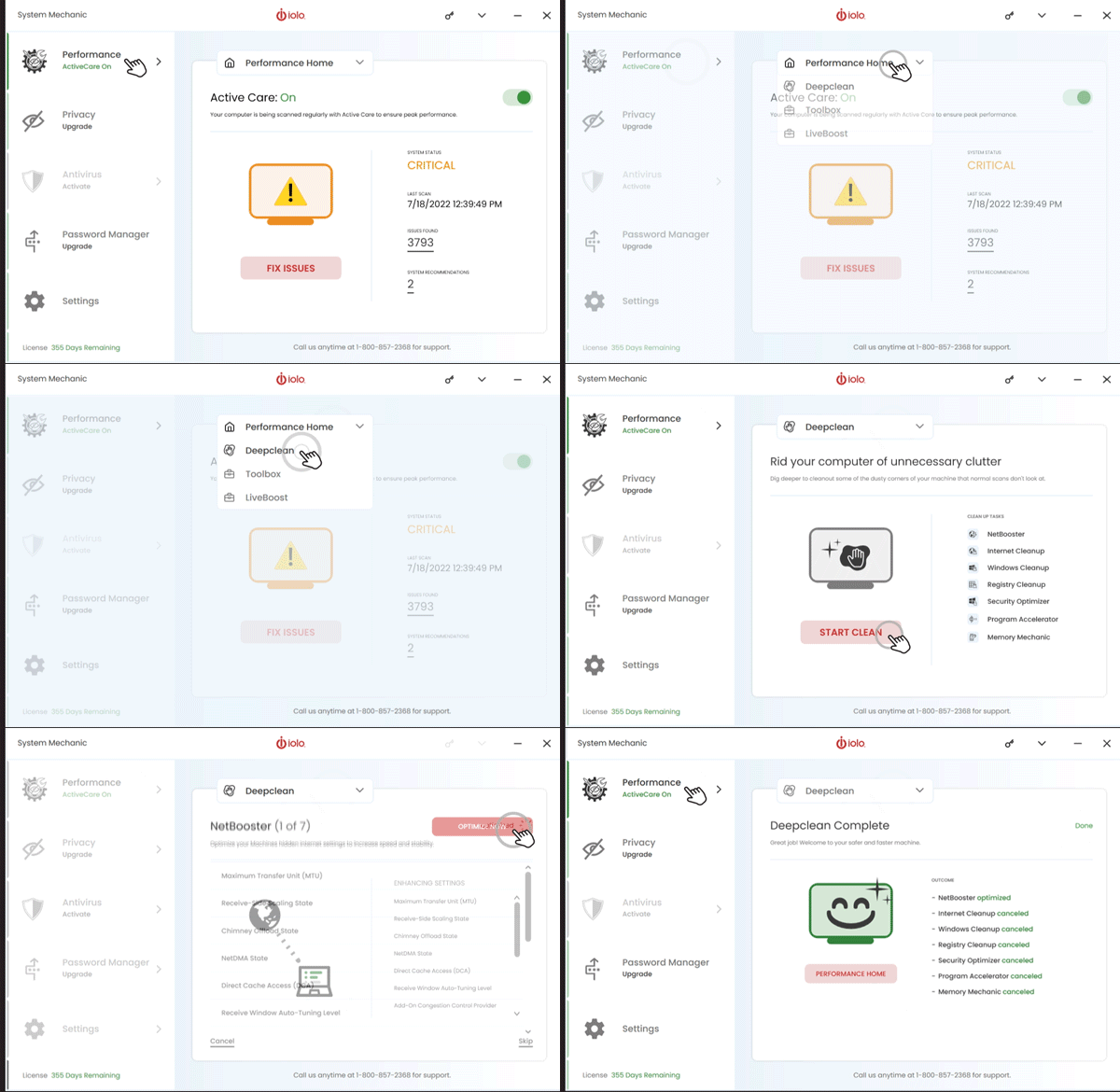
Image: What is New in System Mechanic 22.7?
Usability Enhancements
Streamlined new dashboard design makes it even easier for you to navigate, and experience your computer operating at maximum performance speed. Below is a screenshot of the UI enhancements/changes to System Mechanic 22.
Image: System Mechanic 22 Dashboard - Better Interface
As always, System Mechanic Ultimate Defense offers best-in-class Windows optimization to speed up all the PCs in your home with just one license. Fine-tune dozens of broadband, hard drive, memory, and processor settings to achieve the very smoothest streaming, gaming, browsing, downloads, video chat, work multitasking, and more.
Enjoy these new enhancements and more in System Mechanic, System Mechanic Professional, and System Mechanic Ultimate Defense!
System Mechanic 22.3 Updates
The team at iolo delivered the latest System Mechanic® version 22.3 in April 2022, with new improvements. Find out below about the 22.3 updates to System Mechanic product family.
New Windows 64-bit Native
System Mechanic just got an even bigger performance boost. Version 22.3 runs natively on Windows 64-bit machines, allowing System Mechanic to run faster and more efficiently. 64-bit processing means you can enjoy enhanced security, increased computing power, and more.
New Intelligent Product Communications
New intelligent product communications are designed to provide the most relevant and valuable information through advanced artificial intelligence algorithms. These communications help ensure your system runs at the most optimized performance while continuing to experience ultimate privacy and security.
Recently Added New and Enhanced Features
New Bluetooth scanning abilities are designed to improve your awareness and understanding of the network around you. An updated, more streamlined dashboard means your computer will be operating at maximum performance speed in no time.
Enhancements include:
- New Usability enhancements
A more streamlined dashboard and enhanced menu make it even easier to get your computer operating at maximum performance speed. - New Bluetooth scanning abilities
New bluetooth scanning abilities help identify and remediate privacy threats sitting deep within your network in the form of spoofing. This feature prevents unintended data sharing occuring over Bluetooth, and is designed to improve your awareness and understanding of the network around you.
Advanced On-Demand Boost™ for a faster, more responsive PC
New and re-designed On-Demand Boost improves your PC’s responsiveness and performance whenever you choose. One click can now suspend system-taxing processes, in addition to running services.
- On-Demand Boost adds immense power to resource-intensive sessions such as gaming, rendering video, and other demanding tasks.
- Now On-Demand Boost offers you the ability to select specific processes that are draining computer resources and are unnecessary, allowing you to suspend them for a faster machine right when you need it most.
- Just choose from an automatically generated list of available processes you can pause to increase system speed even more.
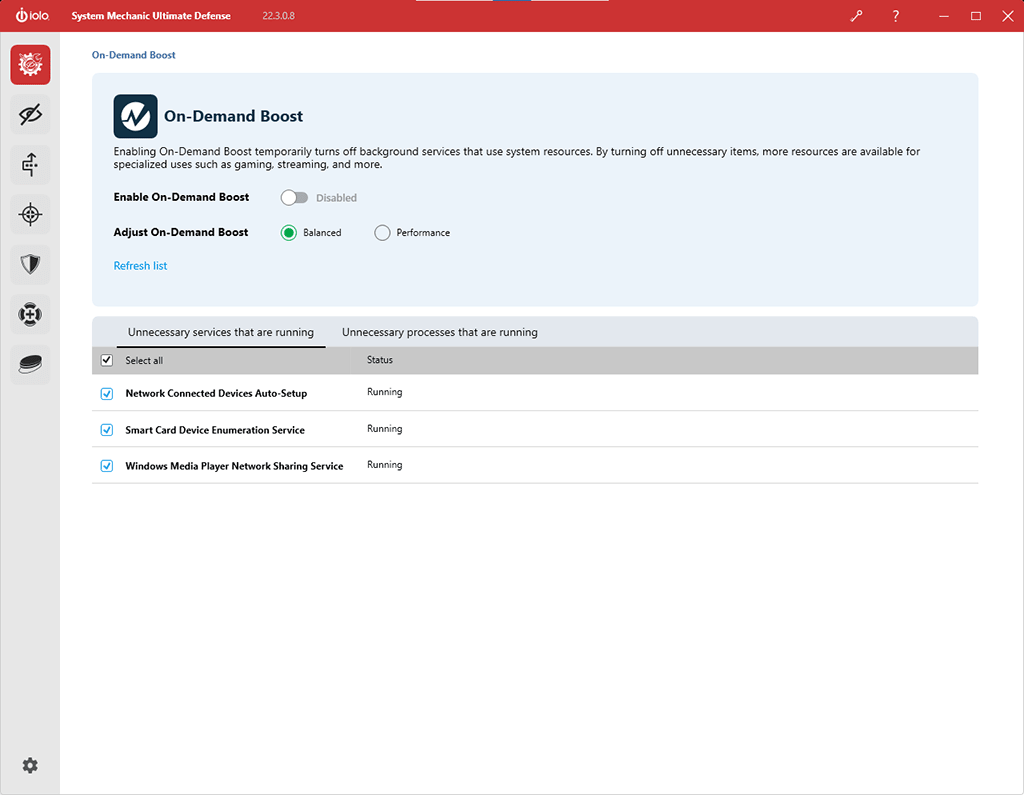
Image: System Mechanic 22 On-Demand Boost
Network Scanner
Prevent devices on Bluetooth, hard-wired, and WiFi connections from leaking private information or creating vulnerabilities on your home router. This new feature scans for devices on your network using bandwidth that could be causing congestion.
- Hackers use automated scanners to check for open router ports and label them susceptible to attack.
- Open ports will eventually attract attacks that try and guess your router login credentials, but threats go far beyond this.
- Security cameras, thermostats, gaming consoles, smart TVs, phones, speakers and many other connected devices can be exposed to hacks.
- You could even be recruited as part of a Distributed Denial-of-Service (DDoS) attack, which saps bandwidth you’ve paid for.
- Network Scanner finds and lists active and potentially vulnerable devices, helping you avoid unnecessary slowdown and protect your home from malicious threats.
If you are experiencing significant slowdown, it may indicate that router ports are open and vulnerable to inviting spoofed DNS and other malicious queries.
- The System Mechanic Network Scanner lists both potentially vulnerable router ports and any associated service that might be malicious.
- The Network Scanner now finds and lists more types of home connected devices, as well as open router ports on your Local Area Network. These can include security cameras, gaming consoles, smart TVs, phones, and many other connected devices.
- Now the Network Scanner lists all the Bluetooth devices within your network that are broadcasting information.
- The new scanning ability includes both regular Bluetooth devices and devices that broadcast over BTLE protocol as well.
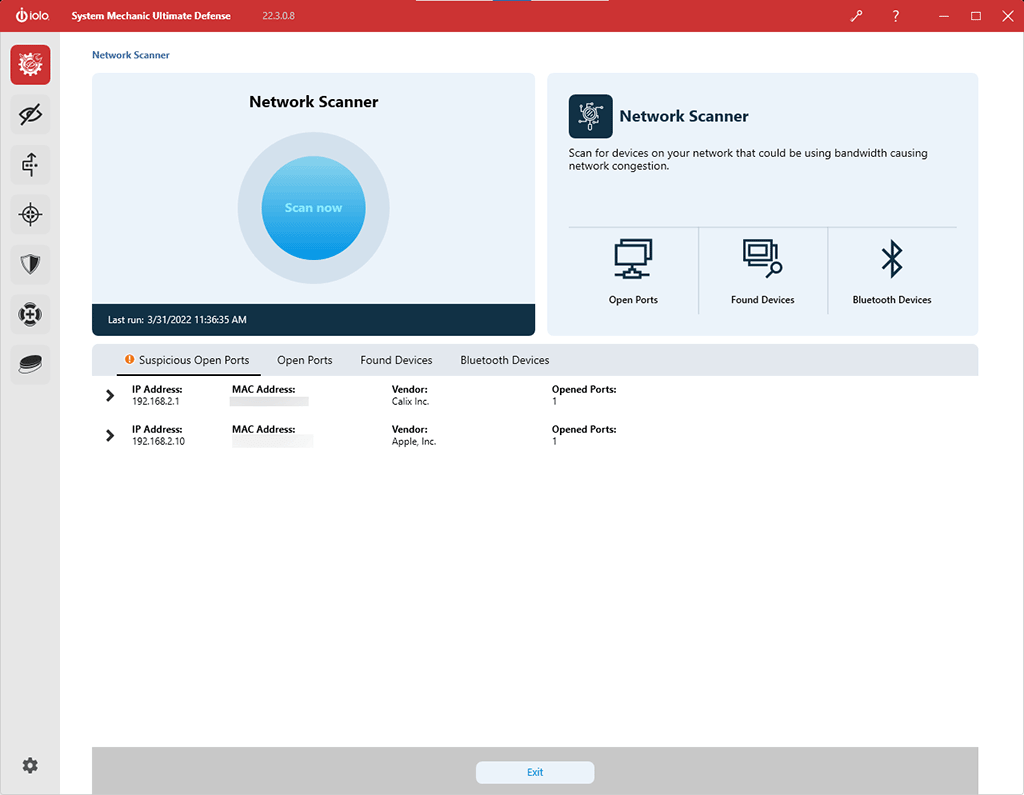
Image: System Mechanic 22 Network Scanner
Advanced Privacy Guardian™ Data-mining Protections
New features in Privacy Guardian can now prevent both the operating system and your installed apps from accessing and sharing a wide array of personal information. Available in System Mechanic® Ultimate Defense™ and System Mechanic as a trial.
Now you can easily disable Windows and third-party applications access to:
- Your Document libraries
- Your Picture libraries
- Your Video libraries
- Your Contacts
- Your Calendar
- Your Emails
- Your Text and MMS messages
- Your Call History
- Your Notifications
These locations may contain private images, information, or correspondence you don’t wish to share with the applications installed on your computer. Privacy Guardian makes turning them off simple.
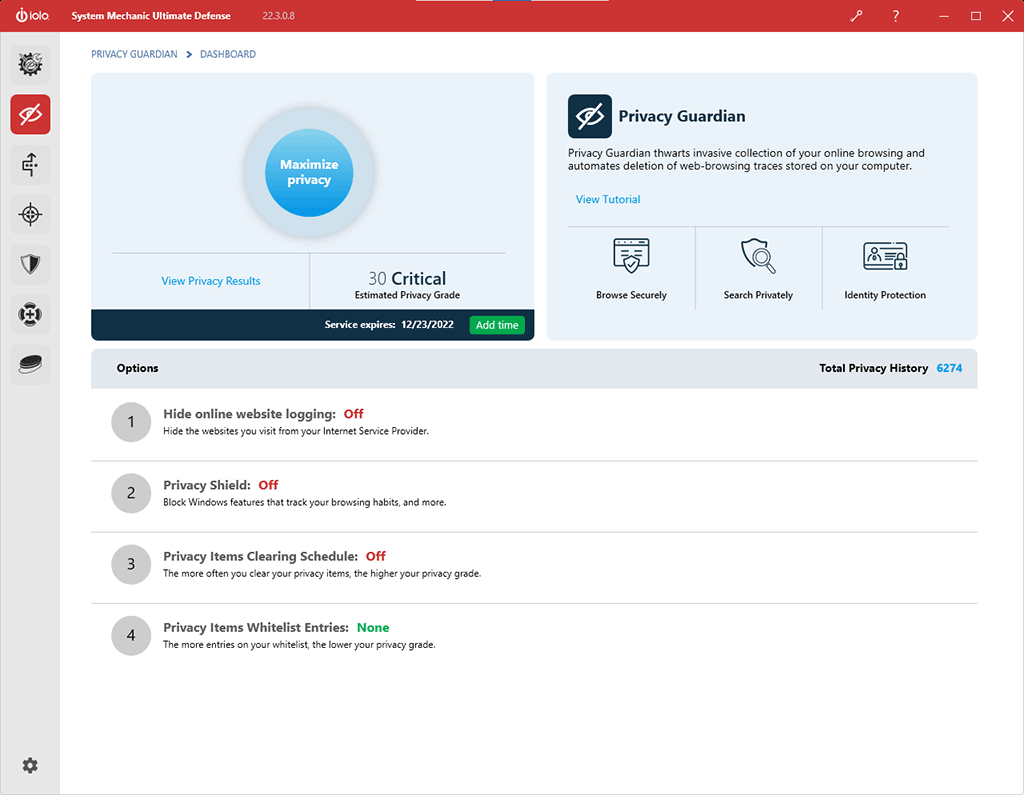
Image: System Mechanic 22 Privacy Guardian
Process Scanner
Now you can also scan your computer for processes that are currently draining the most system resources, likely leading to preventable slowdown.
- The perfect complement to the bloatware-finding feature Startup Optimizer™
- Lists unnecessary processes currently running in real time
- The most system-taxing items are listed first
- Recommends terminating or uninstalling apps you may no longer need
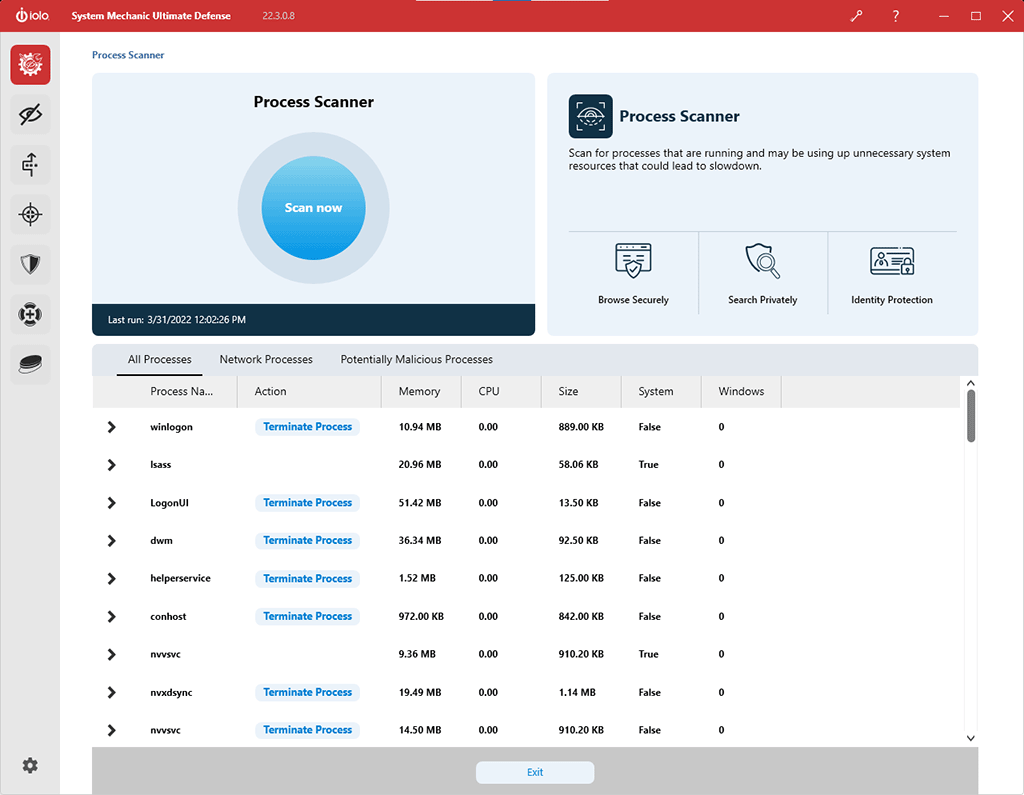
Image: System Mechanic 22 Process Scanner
New in System Mechanic Pro® and System Mechanic® Ultimate Defense™
All of the above System Mechanic features are included in System Mechanic Pro and System Mechanic Ultimate Defense, plus:
Enhanced Antivirus Protection
The real-time antivirus protection System Shield® has been updated with a new AV engine to intelligently discover and block the latest threats.
- AI-based threat detection – Like Malware Killer, System Shield now uses machine learning to spot potential new threats. The new artificial intelligence trains itself with ever-improving models to identify suspicious behavior without depending on existing malware samples as a reference.
- Macro variant detection – This new feature looks for new versions of known Macro viruses, which are particularly stealthy viruses written using macros typically found in word processing applications.
- Packed executables detection – Viruses that are “packed” have been compressed, and will decompress at run time. This malicious tactic turns known threats into something much harder for scanners to detect. The new System Shield identifies suspicious packed files, even if they are not yet recognized as malware.
- Improved virus definitions – The new streamlined infection signature process delivers a smaller footprint, with more efficiency and laser-focused precision.
Usability Enhancements
Streamlined new dashboard design and 1-click ’Repair All’ button make it even easier for you to navigate, and experience your computer operating at maximum performance speed. Below is a screenshot of the UI enhancements/changes to System Mechanic 22.
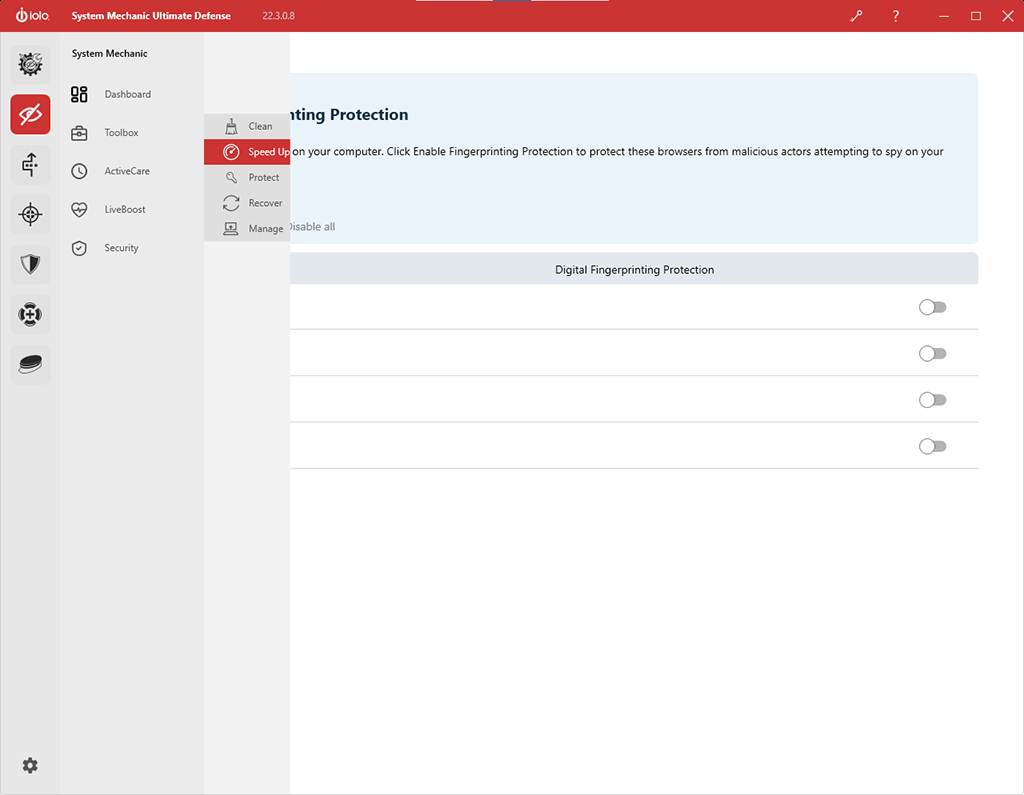
Image: System Mechanic 22 Dashboard - Better Interface